
Technical Solutions Document
1. Abstract
The proposed Hostel Management System is a cloud-based platform designed to digitize and centralize hostel operations, student monitoring, staff management, room occupancy, canteen activities, financial tracking, and administrative processes.
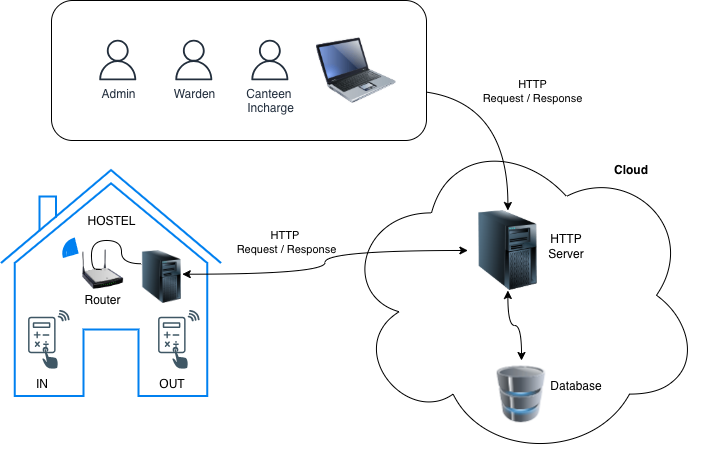
A key component of the system is biometric-based student and staff movement monitoring. Two biometric devices supporting face recognition and fingerprint authentication will be installed at designated IN and OUT points. Every authentication transaction generated by these devices will be collected and synchronized with the cloud-based backend. The system will maintain both the original device logs and processed movement records, enabling administrators to view real-time and historical student/staff movement information through a centralized dashboard.
The platform will provide live visibility of students inside and outside the hostel, identify missing or overdue students, and integrate movement information with outpass and travel/home-return records. Configurable rules will generate alerts when students fail to return within their approved or expected time.
In addition to biometric monitoring, the system will manage student registration, room and bed allocation, fees, advances, payment receipts, staff attendance and salary, canteen inventory and expenses, electricity bill sharing, administrative expenses, legal compliance and vehicle maintenance. Comprehensive dashboards and reports will provide management with operational and financial insights.
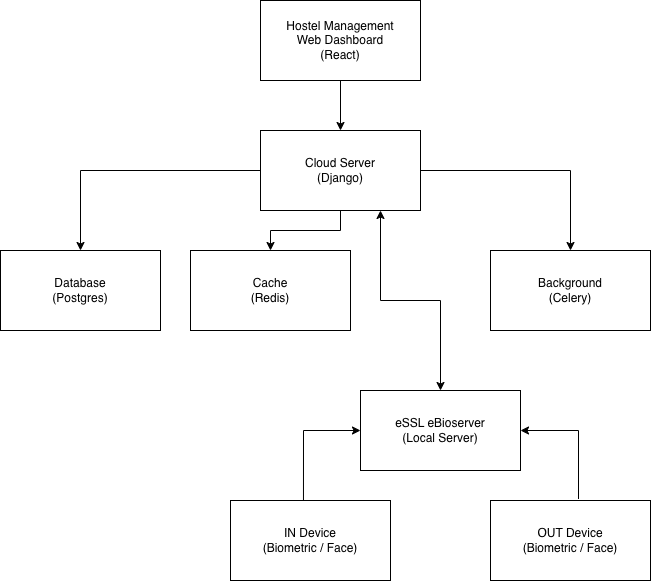
The proposed architecture uses a cloud-hosted application with a secure REST API, PostgreSQL database, background processing services and a web-based management dashboard. A vendor-neutral biometric integration layer will allow different biometric device manufacturers to be supported without changing the core hostel management application.
The solution is designed to be scalable, secure and extensible, allowing additional biometric devices, hostel buildings, campuses, mobile applications, payment gateways, ERP integrations and AI-based analytics to be incorporated in future phases.
2. Business Requirement
- Centralize all hostel management activities in one system.
- Maintain complete student master data.
- Monitor student IN/OUT movement using fingerprint/face recognition devices.
- Install one biometric device for IN and one for OUT.
- Collect all biometric logs in the cloud.
- Show student current IN/OUT status on the dashboard.
- Generate missing student alerts when students do not return on time.
- Manage outpass requests, approvals and returns.
- Manage student travel/home-return details.
- Track fees paid, unpaid and pending.
- Manage student advances and payment receipts.
- Manage rooms, beds and occupancy/vacancy.
- Maintain staff master and attendance.
- Manage staff salary details.
- Manage canteen inventory and expenses.
- Manage EB bills and room-wise bill sharing.
- Manage administrative expenses.
- Maintain legal compliance and due-date reminders.
- Manage vehicle maintenance details.
- Provide daily, weekly and monthly reports.
- Provide a centralized management dashboard for hostel operations.
- Maintain user access control and activity history.
- Provide cloud-based access to authorized users.
3. System Overview
4. Solution Architecture
5. Hardware Components
| No. | Hardware Component | Quantity | Purpose |
|---|---|---|---|
| 1 | Biometric Device – IN | 1 | Capture student/staff entry using fingerprint/face recognition |
| 2 | Biometric Device – OUT | 1 | Capture student/staff exit using fingerprint/face recognition |
| 3 | Network Router / Wi-Fi Router | 1 | Provide Internet connectivity for biometric devices |
| 4 | Network Switch | As required | Connect biometric devices and other network equipment |
| 5 | LAN Cable (Cat6) | As required | Connect biometric devices to the network |
| 6 | UPS / Power Backup | As required | Provide backup power to biometric and network equipment |
| 7 | Power Adapter / SMPS | As required | Supply power to biometric devices and network equipment |
| 8 | Cloud Server | 1 | Host the Django application, database and integration services |
| 9 | Administrator Computer / Laptop | As required | Access the hostel management dashboard |
| 10 | Printer | Optional | Print payment receipts, reports and other documents |
6. Software Components
| No. | Software Component | Proposed Technology | Purpose |
|---|---|---|---|
| 1 | Web Dashboard | React.js / Next.js | User interface for hostel management and monitoring |
| 2 | Backend API | Django + Django REST Framework | Business logic and API services |
| 3 | Database | PostgreSQL | Store students, staff, rooms, biometric logs, fees and other data |
| 4 | Background Processing | Celery | Process biometric logs, alerts, reports and scheduled tasks |
| 5 | Message Broker / Cache | Redis | Queue management, caching and temporary data processing |
| 6 | Biometric Integration Service | Python / Django Service | Communicate with biometric devices and collect IN/OUT logs |
7. Implementation Roadmap
| Phase | Activities | Timeline |
|---|---|---|
| Phase 1 – Requirement & Design | Finalize requirements, workflows, database design, UI design and system architecture | Week 1 |
| Phase 2 – Cloud & Backend Setup | Cloud server, PostgreSQL, Redis, Django REST API, authentication and user roles | Week 1 |
| Phase 3 – Master Data | Student, staff, room, bed, course and hostel master | Week 1–2 |
| Phase 4 – Biometric Integration | Configure 2 biometric devices, IN/OUT mapping, user synchronization and log collection | Week 1–2 |
| Phase 5 – IN/OUT Monitoring | Movement processing, live status, attendance and movement history | Week 2 |
| Phase 6 – Outpass & Travel | Outpass, approval, travel and expected-return management | Week 2–3 |
| Phase 7 – Alerts | Missing student, overdue return and device-offline alerts | Week 3 |
| Phase 8 – Finance & Administration | Fees, payments, receipts, advances, salary, expenses and EB bills | Week 2–3 |
| Phase 9 – Rooms & Canteen | Room occupancy, bed allocation, inventory and canteen management | Week 3 |
| Phase 10 – Dashboard & Reports | Management dashboard, monitoring screens and reports | Week 3–4 |
| Phase 11 – Testing & UAT | Functional testing, biometric testing, offline synchronization and UAT | Week 4 |
| Phase 12 – Deployment & Training | Production deployment, data migration, user training and go-live | Week 4 |
No comments to display
No comments to display